JayGeeOriginal postSouth Africa · Feb 8, 2012#1Hi 🙂
Locally (South Africa) the RVC is not offered on the new Yaris.
My car has the touch screen audio system - no nav yet though - and as far as I can tell, it should have an input for a RVC.
Has anyone retrofitted one with the OEM touch screen audio system yet?
Is it pre-wired? There seems to be an insert in the hatch (number plate light housing) where I assume a camera can be mounted. Does the radio have to be programmed by the dealer before it will work?
Any idea what other Toyota product's (locally the Fortuner, Land Cruiser range and Hilux do have RVCs) camera or 3rd party camera will work?
I'm not sure about the results I get on eBay - most of them look like they are for the previous gen Yaris.
I'd be more than willing to post pictures or create a DIY sticky, if I can get it working.
Thanks.
Replies 55
SineWaveSydney, Australia · Feb 8, 2012#2I just started doing this. I've removed the back trim from the hatch and the plastic insert where the camera goes, but I can't find any cameras that will fit properly. I might have to fit one into the plastic insert somehow. There is a connector with three wires (maybe Ground/Earth, +12V and video? Haven't checked) right next to the camera hole.
SineWaveSydney, Australia · Feb 8, 2012#3Forgot photos.
8 attachments not included in this copy
Originally Posted by
SineWave ↑ Forgot photos.
Thank you very much for the photos. They are a great help.
From the pictures, it looks like a camera with a mounting similar to this one might work.
http://www.ebay.com/itm/TOYOTA-Crown...item27c221981a I'll investigate a bit further this weekend.
Thanks for that. I'll measure the plastic insert and see.
JayGeeThread starterSouth Africa · Feb 8, 2012#6I've just been to a Toyota dealership.
Although there is an image for the RVC on the parts system, there is no model number or price for it yet.
From what I could tell from the images on the system, it looks the same as the one on the Fortuner. Asking price is around $600 (converted from local currency) -excl. fitment - for that one though 😳
NO WAY am I paying that.
You can buy a decent HD video camera for that price!
ciscobearBarbados · Feb 9, 2012#7Good pics SineWave, I have the same slot available on my Belta. I am looking at the Pioneer ND-BC5 to use with my AVH-P3300BT
CTScottUSA, CT · Feb 9, 2012#8The Toyota part number for the camera is: 86790-0D010
That part number is unique to the Yaris, but the shape of the camera looks identical to the one on my Tacoma.
For the Yaris, the camera connector should be a 6 pin connector, with 4 wires: Brown is power ground, red is +12 power, black is video and white is video ground.
JayGeeThread starterSouth Africa · Feb 10, 2012#9Thanks CTScott.
The Tacoma you mention seems to be similar to our local Hilux pick-up with the Fortuner being its SUV derivative.
I was told that the Hilux's camera was wireless (don't know if this really is the case though), but from the diagram on the parts system, the 2011-> spec Fortuner's does look similar to the Yaris's.
The Fortuner is very popular locally, so I have high hopes of tracking down a second hand one at a reasonable price. I probably won't go over $150 though. I'm a bit wary of the >$30 imports. If I can't get the OEM look, then I won't bother.
It's not something I really need - I'm doing it more to see if I can do it.
Just hoping my car is prewired for it.
CTScottUSA, CT · Feb 10, 2012#10MaineYaris12location location location · Feb 12, 2012#11you realize this is A COMPACT VEHICLE not a rig, learn to drive that way you wont need a nanny
SineWaveSydney, Australia · Feb 12, 2012#12That's not the point. It's designed to have the functionality. ^_^
JayGeeThread starterSouth Africa · Feb 13, 2012#13 Originally Posted by
MaineYaris12 ↑ you realize this is A COMPACT VEHICLE not a rig, learn to drive that way you wont need a nanny
😆
Originally Posted by
JayGee ↑ It's not something I really need - I'm doing it more to see if I can do it.
Originally Posted by
CTScott ↑
Thanks for the info Scott.
From the photo, it doesn't look like it will fit the Yaris though.
I opened up my car this weekend and it has the same connector as seen on SineWave's 4th photo above, which I assume (and hoping) to be for the camera.
It's a 6 pin connector with only three wires, brown, blue and black, but they run to pins 10,11 and 12 on the larger connector next to it (OK1 or OP1), whereas the camera wires are supposed to be on 14,15,16, and 17. There aren't any wires in those positions. I have one of
these cameras which will fit with a bit of encouragement. Running a video lead to the head unit won't be overly difficult, but I still would have liked the cables to have already been fitted from factory.
Originally Posted by
SineWave ↑ I have one of
these cameras which will fit with a bit of encouragement.
How will you get it angled correctly or do you plan on fitting it in another position instead? I'm assuming you don't just want to see the rear bumper (pretty as it is 😛) on the monitor.
Yeah, it won't be flush with the flat face of the plastic insert, but instead angled up and then epoxied in place.
SineWaveSydney, Australia · Feb 13, 2012#18Gotta remove the head unit and test that it'll work first, though. I hope there's no tricks to this other than hooking up the video signal and being in reverse. :)
JayGeeThread starterSouth Africa · Feb 13, 2012#19 Originally Posted by
SineWave ↑ Gotta remove the head unit and test that it'll work first, though. I hope there's no tricks to this other than hooking up the video signal and being in reverse. :)
From my research, it should display on the monitor along with some disclaimer to check entire surroundings (or something similar) when the audio system detects an input signal - no dealer programming needed.
ALWAYS best to check for yourself though. Can't believe everything you read on the internets and we are dealing with different region specs\builts here.
Please report back, if you (or anyone else) do get this working. This will pretty much determine if I go ahead with my project or not. I'm not too comfortable with wiring and I certainly don't want to blow anything up or mess with the warranty in any way..
I retrofitted PDC on one of my previous cars and was on the brink of heart failure the whole time...
@SineWave
Have you installed the camera you mentioned earlier in the thread yet?
You don't by any chance have the measurements of what the OEM camera (or the insert that currently fills the gap) should be? I want to figure out if this
Crown one will fit.
I'm still keen on doing this.
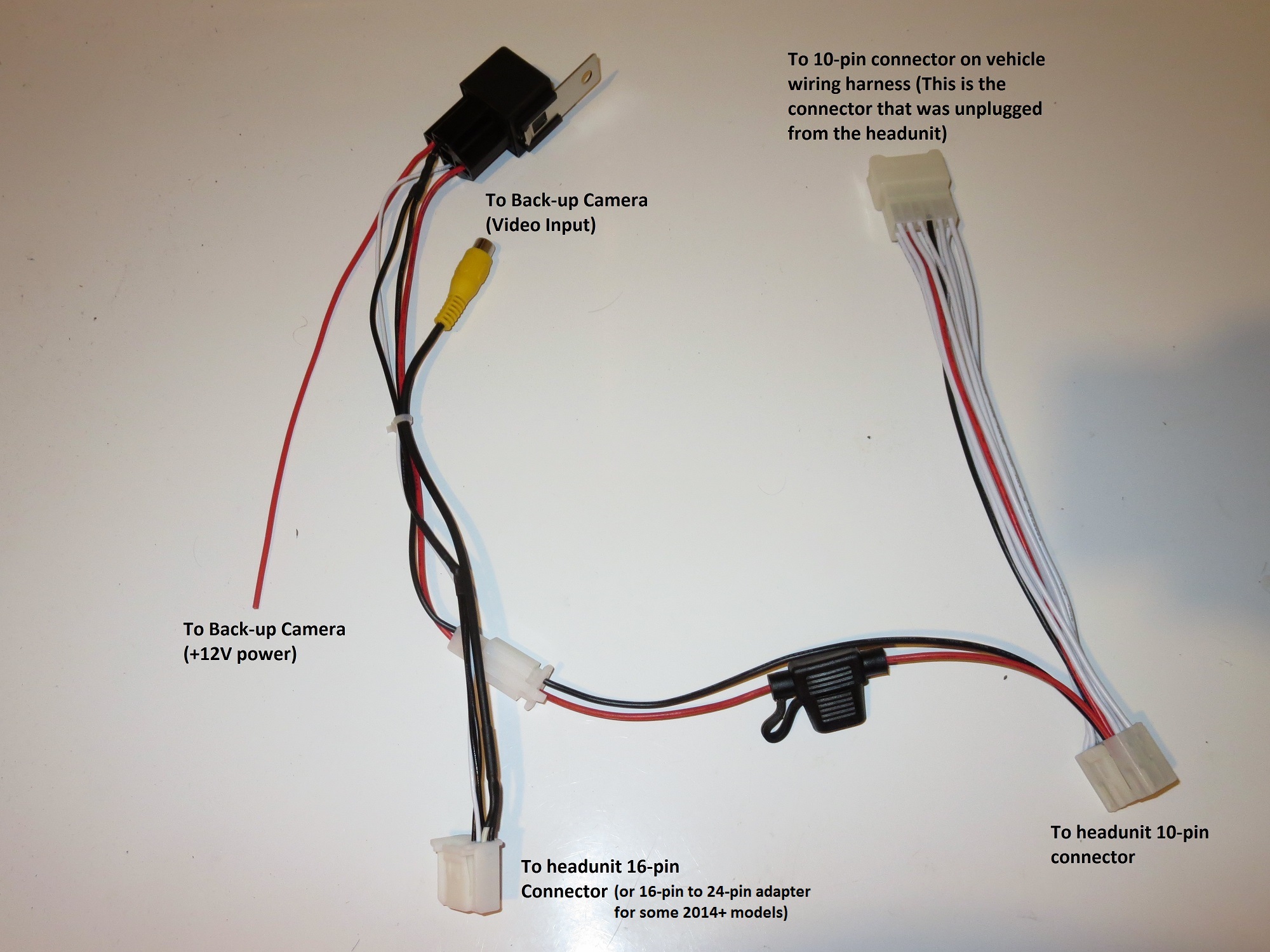
I removed my head unit last night, and the connector that is supposed to have the camera signal only has one wire going into it. See the attached image, it's pin 6, park brake sense. This wasn't plugged into the back of the unit, which explains why my system functionality test never showed park brake being on. I tried placing bare wires down the back of the connector, but couldn't get the screen to change to video mode. Video signal went in pin 8, +V went in pin 7 (will check if there is any voltage there or not today) and GND went in pin 16. Video - is supposed to be on pin 15, don't know if I need to short this to GND/pin 16. Will check for continuity.
Does anyone know where to get the pin sockets to populate this connector?
2 attachments not included in this copy
Ouch, and here it thought this would be an easy retrofit...
Perhaps I'll muster up the courage some time this week to take my head unit (mine is different to yours) out and have a look.
SineWaveSydney, Australia · Feb 27, 2012#23The pins actually look like the IDC headers on the backs of IDE hard drives and CD drives. I have a whole bunch of single pin socket leads like these:
Picture not included in this copy
Will try again soon.
kend_sidAlgeria · Jun 3, 2012#24Hi,
Could you please tell us if you installed the oem camera succefully ?
Thanks a lot for feedback
Regards
DerKaiZeRsPerth WA · Jun 23, 2012#25Hi guys, just wondering if someone had installed a rear camera for Yaris Sedan? Did some research in ebay and still not sure what model of camera that fits in Yaris Sedan.
Rsoft2006Algeria · Jul 9, 2012#26Hi Every body, I have read your comments, and i want to setup a reverse cam in my car, i just want to add this feature!
william7Poland · Apr 15, 2013#27Up!
Is any one who made this work?
I have one conector but orginal camera has diferent plug...
1 attachment not included in this copy
Originally Posted by
william7 ↑ Up!
Is any one who made this work?
I have one conector but orginal camera has diferent plug...
For the European third generation Yaris the factory connector for the camera is a gray six pin connector with four pins used.
The wires on the connector are red (power), white (video ground), black (video output), and brown (power ground).
The only camera connections I've seen are an RCA female from the camera and a power wire. You connect the power wire to the reverse lights in the back of the car.
You run a supplied cable to the front of the inside of the car. Either buy a review mirror monitor or a dash mount. Each take 12 volts.
william7Poland · Aug 10, 2013#30I change my Yaris 2012 HB radio to the Toyota Touch receiver.
I have oem Yaris rear camera but the problem is wiring harness. My version of Yaris doesn't have the wirings for rear camera.
CTScott send me a diagram for audio in French made Yaris.
I understand that the wires go to connector F117 (F117 connect to the left top plug of receiver).
Can I take the power from reverse light and connect only video power and ground to receiver?
What mean CA+, CB+ on the diagram?
2 attachments not included in this copy
You could power it separate of the radio, but the CA+ to CB+ is the positive power output to the camera by the radio, where it only powers the camera when it needs to.
william7Poland · Aug 10, 2013#32So +12V for camera is pin 7, ground pin 15. Right?
Where I can buy the F117 connector? I have no 16 pin connector in my radio wiring harness.
Edit:
I take reverse gear and check 7 pin and no power...
ucsmfuvancouver, BC · Oct 3, 2014#33ucsmfuvancouver, BC · Oct 3, 2014#34 Originally Posted by
CTScott ↑ The Toyota part number for the camera is: 86790-0D010
That part number is unique to the Yaris, but the shape of the camera looks identical to the one on my Tacoma.
For the Yaris, the camera connector should be a 6 pin connector, with 4 wires: Brown is power ground, red is +12 power, black is video and white is video ground.
CTScott, I can't find that part anywhere online :(
Will try going for this one
http://www.ebay.com/itm/Car-Reverse-...0cd598&vxp=mtr Thanks
Originally Posted by
2009D4d ↑
Thanks, however, my yaris doesn't have a built in head unit display :(
So I don't think the connector plug will work :(
Originally Posted by
SineWave ↑ Forgot photos.
I know this is an old thread but I have the correct OEM camera for the rear hatch... The black "block off plate" insert thing that has the two bolts holding it in place that is clearly shown in SineWave's picture: how the heck do I get that off? The nuts that are attached to the bolts when turned cause the bolts themselves to turn as well. What am I missing here?
Originally Posted by
coolcolger ↑ I know this is an old thread but I have the correct OEM camera for the rear hatch... The black "block off plate" insert thing that has the two bolts holding it in place that is clearly shown in SineWave's picture: how the heck do I get that off? The nuts that are attached to the bolts when turned cause the bolts themselves to turn as well. What am I missing here?
From his photos it looks like you can either insert an allen wrench into the end of the bolt, or hold it with a tiny socket to then let you loosen the nut.
Originally Posted by
coolcolger ↑ I know this is an old thread but I have the correct OEM camera for the rear hatch... The black "block off plate" insert thing that has the two bolts holding it in place that is clearly shown in SineWave's picture: how the heck do I get that off? The nuts that are attached to the bolts when turned cause the bolts themselves to turn as well. What am I missing here?
Had the same issue here they unscrew from the plastic piece of the cover. I had to remove the plastic piece very carefully and got it off but it was a pain in the butt. Also once you are about to put it back on you have to add the screws to the plastic piece and then add it to the back door. I have not done that as I want to add some jb wells glue or something to the screws so this will not happen again when/if I ever unscrew them.
cheap car, cheap parts, cheap it is cheap it does (stupid is, stupid does)
Let me know if you guys have had any issues removing this thing.
Also have found this camera that may just bold on to this car..
http://www.ebay.com/itm/171593317287...%3AMEBIDX%3AIT been in touch with the seller and have provided pics and measurements of the black part that is on the car and he says this may fit. I have ordered it and should get it next week. I will let you guys know if it fits..
On that same note is there a harness that I can add an aftermarket cam to the stock head unit? I have the AXCP-Q15U (T10028) unit. Let me know, thanks.
Originally Posted by
CTScott ↑ From his photos it looks like you can either insert an allen wrench into the end of the bolt, or hold it with a tiny socket to then let you loosen the nut.
There is no hole in the end of the screw, yes perhaps a tiny socket or even a pair of grip pliers will do but I only had a long socket with a rachet, so the screw was covered completely.
Anyhow I managed to take it off and just need some glue to add on the screws when I put it back in place so that the bolts do not spin as I tighten up the nut.
Also, tried to post a link for an after market camera but seems that my post have been deleted?? Don't know if im not supposed to link to ebay sellers but I see other people have done it so.
Anyhow I found a camera that may be a direct fit for this and I have been in contact with the seller I have sent him pics and measurements of the cover and he said that the one I ordered should fit. I should receive it next week I will let you guys know if it fit.
On that same note, is there a harness that I can use for a stock radio for the 2015 Yaris LE?
Thanks.
OGHUGOCanyon Lake, CA · Jul 22, 2015#42Update on the camera I purchased.. OK so I got the camera and no it does not fit properly it is not even long enough to reach the outside where the opening is on the plastic molding. So I tried to get another one that has a longer neck. Here is the ebay auction if you guys are interested.
http://www.ebay.com/itm/171593321191...%3AMEBIDX%3AIT I will see if that works. and let you guys know.
What is the part number for the stock rear view camera and how much will it cost from the dealership any one know?
OK, while I wait for the new camera to arrive I wanted to start wiring my in the stuff I will need. Does anyone know where the wire for the reverse light is? Need to tap in to that for the head unit to properly display the camera when in revers.
Thanks in advance.
ucsmfuvancouver, BC · Jul 22, 2015#44OGHUGOCanyon Lake, CA · Jul 23, 2015#45 Originally Posted by
ucsmfu ↑
Man thanks for the info, however how is it that the camera you got was a perfect fit? did you leave the hole in the car after the install? that looks like it will just fit on the molding but doesn't seem like it will cover up the home that is left on the actual door. I want something that is going to go bolted on the 2 bolts and goes straight outside sortha like the actual factory one with out having to pay factory prices.
Also where is the wire for the ecu that I need to tap into?
Thanks again.
Originally Posted by
OGHUGO ↑ Man thanks for the info, however how is it that the camera you got was a perfect fit? did you leave the hole in the car after the install? that looks like it will just fit on the molding but doesn't seem like it will cover up the home that is left on the actual door. I want something that is going to go bolted on the 2 bolts and goes straight outside sortha like the actual factory one with out having to pay factory prices.
Also where is the wire for the ecu that I need to tap into?
Thanks again.
I'll take pics for you tomorrow, it is a perfect fit, eventhough it doesn't mount on the two screws, it's a perfect fit and won't fall out.
I didn't tap to ecu because I didn't wanna mess around with it, tapped the reverse trigger wire to the reverse light red wire :)
Ok, so i got the other camera and no go still does not fit. now its like $65 for the cost of both cameras and no go. I talked to the seller and he said he can refund if I return them but have to pay for shipping to china.. I have given up on trying to find one that is like the oem and got one like the one you got UCSMFU but got it from a us seller for $23 rather wait a few days than a couple of weeks.
Now I have everything ran all cables but need to get the right cable for the reverse trigger. Does someone have pics of where this is located?
Thanks.
ucsmfuvancouver, BC · Jul 26, 2015#48 Originally Posted by
OGHUGO ↑ Ok, so i got the other camera and no go still does not fit. now its like $65 for the cost of both cameras and no go. I talked to the seller and he said he can refund if I return them but have to pay for shipping to china.. I have given up on trying to find one that is like the oem and got one like the one you got UCSMFU but got it from a us seller for $23 rather wait a few days than a couple of weeks.
Now I have everything ran all cables but need to get the right cable for the reverse trigger. Does someone have pics of where this is located?
Thanks.
yes Eduardo did, wired it up to the ECU
2015 yaris, rear view camera Originally Posted by
ucsmfu ↑
Is that below the steering wheel column? I did not see that on the side.
Also tried to remove the covers and they hard as shit to remove.
Originally Posted by
OGHUGO ↑ Is that below the steering wheel column? I did not see that on the side.
Also tried to remove the covers and they hard as shit to remove.
yes on the left side bottom, above the foot rest.
 Yarisworld