ChadmanOriginal postIowa · Sep 15, 2012#1I have the Micro Image fogs wired them up per the instructions I downloaded from their site with provided switch they worked ok. They acted weird, had to start-up car for them to come on, but they stayed on if I turned the car off, and sometimes they didn't want to come on at all.
They worked for awhile and now have gone dead. I looked over the wiring and fuse and everything seems to be good.
Any ideas?
Replies 19
CTScottUSA, CT · Sep 15, 2012#2It definitely sounds like you had a wiring issue to begin with, with that behavior. I would start with checking the bulbs, as it could be as simple as them being burnt out now.
There are a couple of different iterations of the MI fog wiring guide. Which did you use?
ChadmanThread starterIowa · Sep 19, 2012#3I used the PDF instructions from the Micro Image website.
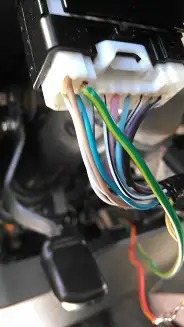
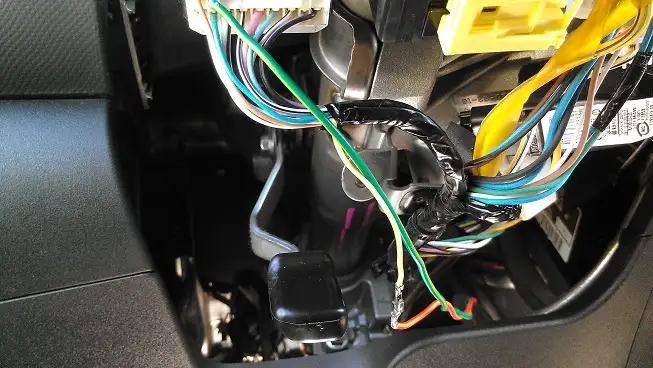
Here are a couple pics of the wiring under the steering wheel. Dont worry about the exposed yellow to red wire. I taped it up real good.
Your pictures did not come through.
ChadmanThread starterIowa · Sep 19, 2012#5should be there now. 🙂
FYI I'm using the switch that came with the kit.
CTScottUSA, CT · Sep 19, 2012#6Try disconnecting your wiring and simply jumping the two wires together that were originally in the two upper left locations of the headlight stalk connector. After you do so, as soon as you turn the headlight switch on and to low beams the fogs should light.
Doing that will tell us whether the problem is under the hood or under the dash.
ChadmanThread starterIowa · Sep 19, 2012#7So to be clear, disconnect the green wire and put the yellow wire back where it was originally, and then jump the yellow wire and the tan wire together in the harness?
CTScottUSA, CT · Sep 19, 2012#8 Originally Posted by
Chadman ↑ So to be clear, disconnect the green wire and put the yellow wire back where it was originally, and then jump the yellow wire and the tan wire together in the harness?
Correct.
Cool, I'll check it later tonight when I get a chance.
Thanks.
CHRIS06canada · Sep 22, 2012#10Hi dear am newbie here and i read this topic and i want to say what i know about your problem you should disconnect the green wire and put the yellow wire back where it was originally, and then jump the yellow wire and the tan wire together in the harness?
ChadmanThread starterIowa · Sep 22, 2012#11I finally have some time to mess with this, so I put the yellow wire back and jumped it with the brown one and the lights work. Now what do I do?
CTScottUSA, CT · Sep 22, 2012#12 Originally Posted by
Chadman ↑ I finally have some time to mess with this, so I put the yellow wire back and jumped it with the brown one and the lights work. Now what do I do?
OK - That means that the switch wiring or the switch itself has an issue. Can you post some detailed pictures of where the wires go into the switch connector and where you had connected the other ends?
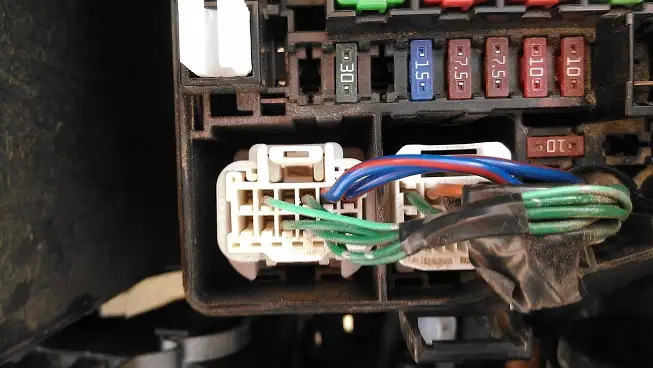
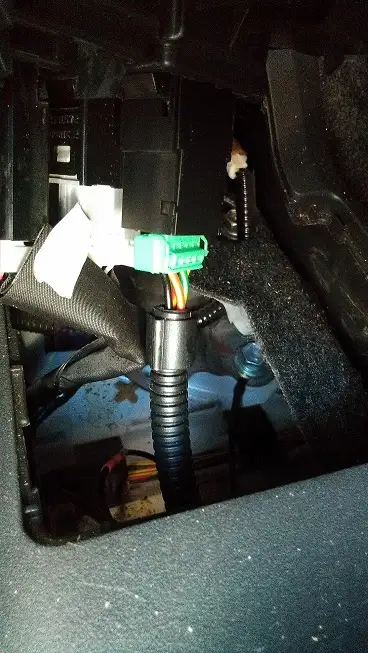
Ok, I have a couple shots here. one of the wires going into fuse box under the hood, and of the wiring connected to the MI switch mounted in my center console.
The pictures in post 3 show where the switch wires went to.
Please try to post your threads in the correct thread section. It's getting old moving all the stuff from the "general discussion" when this was clearly service related. I've moved it to the correct section. 👍
ChadmanThread starterIowa · Sep 23, 2012#15Sorry about that i was being lazy. Won't happen again.
ChadmanThread starterIowa · Sep 23, 2012#16CTScott, I found your directions on the how to install with aftermarket switch. Makes so much more sense now. So I'm gonna rewire it inside accordingly. Should I just use a wiretap to connect to the wires on the D4 connector?
CTScottUSA, CT · Sep 23, 2012#17 Originally Posted by
Chadman ↑ CTScott, I found your directions on the how to install with aftermarket switch. Makes so much more sense now. So I'm gonna rewire it inside accordingly. Should I just use a wiretap to connect to the wires on the D4 connector?
Just make sure it is the version I created:
http://www.microimageonline.com/down...h%20Wiring.pdf For the connection to the D4 wires, tap splices are fine.
If i had to use a new switch witch wires are power, source, and ground?
CTScottUSA, CT · Sep 23, 2012#19 Originally Posted by
Chadman ↑ If i had to use a new switch witch wires are power, source, and ground?
If you use a different switch, the switch contacts simply connect to the two wires on D4. If the switch is illuminated (and it must be a 4 terminal, not 3 terminal switch, where the illumination is separated from the switching), then on the AT shift illumination connector, the green wire is + and the white wire is -.
Success! The switch that came with the kit still switches but does not light up. Oh well, the dash light, and the fogs do so that's all I care about.
Thanks Scott for helping me clear this project up!
 Yarisworld